
In today’s cloud-driven world, security isn’t just about preventing entry. It is about ensuring that once a threat is discovered, it can’t silently return. In Google Cloud Platform (GCP), attackers who gain access may attempt to persist by misusing legitimate services such as Cloud Functions and service accounts. These tools, designed to automate and simplify cloud operations, can be manipulated to redeploy hidden functions, recreate deleted identities, or automatically restore permissions, effectively allowing attackers to maintain continuous access even after initial detection.
Service Accounts in Google Cloud
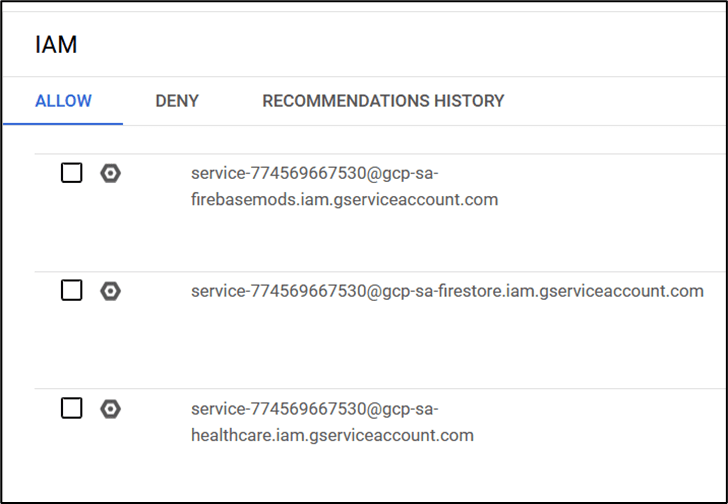
A service account in Google Cloud is a special type of account that is used by applications, virtual machines (VMs) or by anyone to interact with Google Cloud services. It is not associated with an individual user but instead represents a service or application that needs to access Google Cloud resources.
Service accounts follow a security model where APIs and workloads authenticate using keys or tokens that ensures secure, automated access to resources without human intervention.
Cloud Pub/Sub
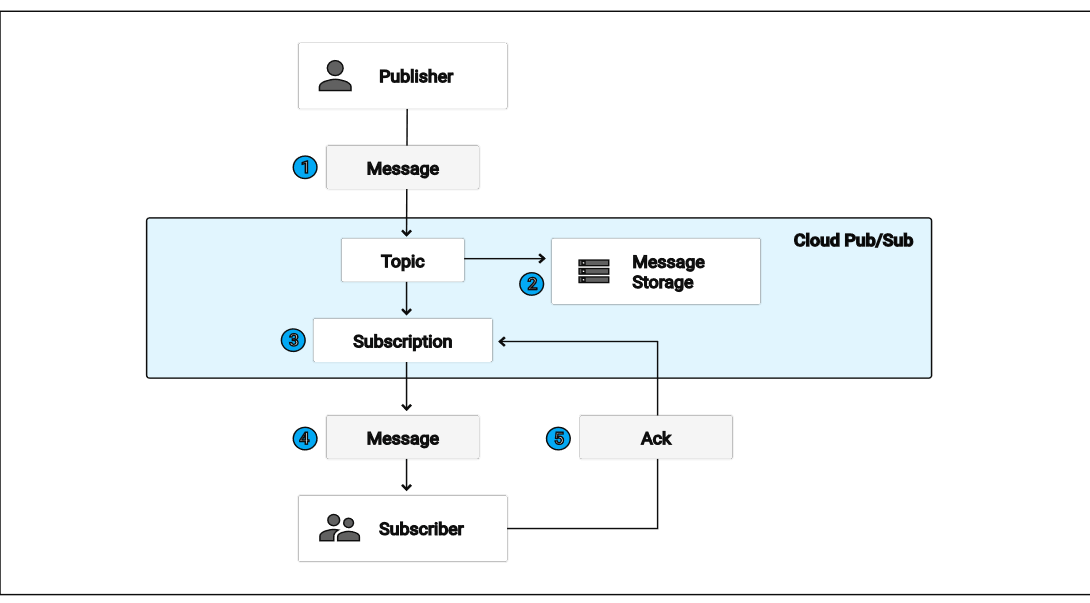
The Google Cloud Pub/Sub API helps you build event-driven systems by allowing different applications to send and receive messages independently. It is designed for asynchronous communication, where messages are published to topics and then delivered to subscriber applications that react to them. This makes it ideal for creating event pipelines, running real-time analytics, or triggering automated workflows based on incoming data (for example, publishing a message to a Pub/Sub topic whenever a new file is uploaded or a transaction is completed).
Google Cloud Function
Google Cloud Functions is a serverless compute service that runs your code automatically in response to events without you having to manage any server or underline infrastructure. It’s perfect for event-driven tasks, like processing files when they’re uploaded to cloud storage, responding to Pub/Sub messages, or handling incoming HTTP requests. For example, you could use a Cloud Function to automatically resize images as soon as they’re uploaded to a Cloud Storage bucket, making it an easy and efficient way to automate workflows in the cloud.
Deploying Simple Cloud Functions
To understand how Google Cloud Functions work, let’s start with a simple example. Imagine you want to create a small piece of code that says “Hello, World!” whenever someone visits a link. No servers, no setup – just your code running in the cloud. That’s exactly what Cloud Functions make possible. Cloud Functions support multiple languages so we can use any supported language as per our experience. For demonstration we will leverage python where you simply write your function in a file called main.py, add a requirements.txt for any dependencies, and deploy it. Google Cloud takes care of the rest, from hosting to scaling, so your code runs automatically whenever it’s triggered by an HTTP request. It’s a simple way to experience the power of serverless computing.
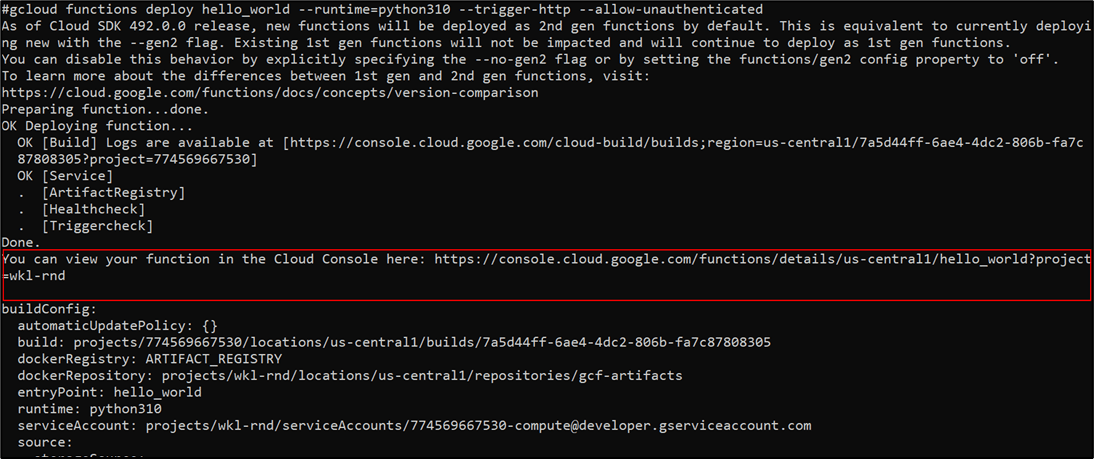
Once the function is deployed, you can access it via the Google Cloud Console. Navigate to Cloud Functions → Your Project → Functions List, and select your function. Here, you can find the trigger URL, monitor logs, and test the function directly from the console.
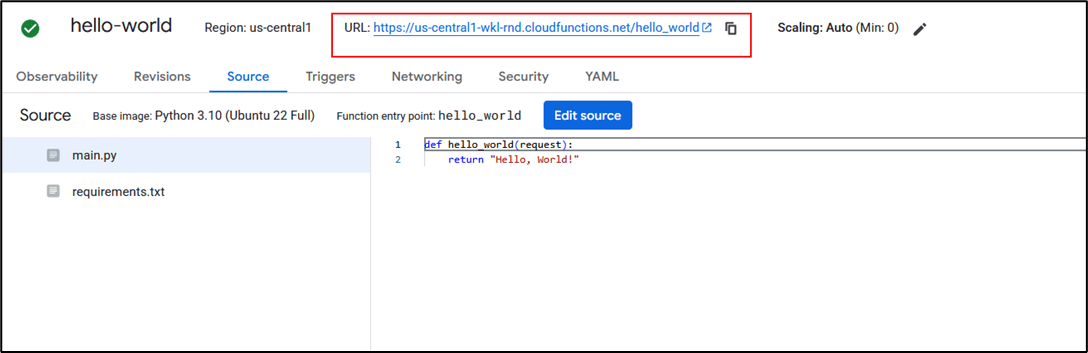
Copy the trigger URL provided for your function. When you access that URL in a browser or via curl, you will see the output: “Hello, World!.”

Google Cloud Logs
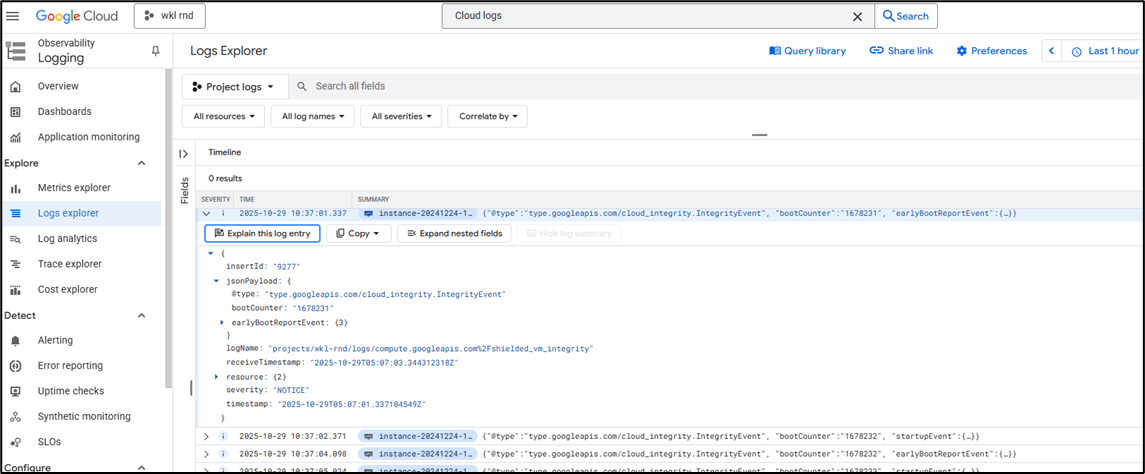
Google Cloud Logs help you track and understand what’s happening across your cloud environment by recording activities, events, and system messages from various services like Compute Engine, Cloud Functions, Cloud Storage etc. They show who did what, when, and from where, giving you visibility for troubleshooting, monitoring, and security. Different types of logs, such as Audit Logs, System Logs, and Application Logs, work together to keep you informed, making it easier to detect issues, maintain compliance, and ensure your Google Cloud setup runs smoothly.
Backdooring the Cloud: Persistence Through Log Sinks and Cloud Functions
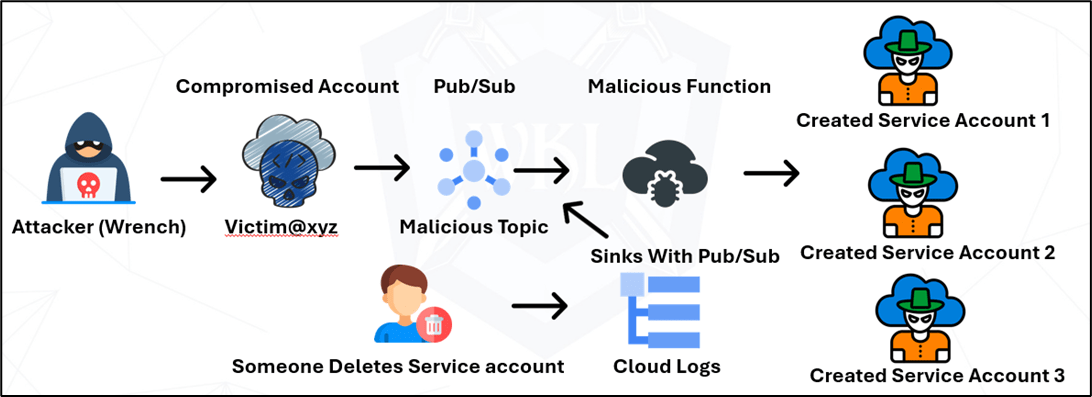
Persistence in cloud environments can be achieved by leveraging automation tools, such as Malicious Google Cloud Functions and IAM policies. This guide details how to implement an automated system that detects when a Google Cloud service account is deleted and then recreates it along with a custom role. This approach ensures that a deleted service account is persistently restored, maintaining access and permissions within the Google Cloud Platform (GCP).
Note: For deploying persistence, you will need privileged access in the target environment.
The newly created Pub/Sub topic acts as a secure, centralized messaging channel for IAM-related events (for example, notifications when service accounts are created, modified, or deleted). Once those events are published to the topic, downstream subscribers, such as monitoring tools, alerting systems, or approved automation workflows, can consume them to log activity, trigger investigations, or kick off remediation processes.

Use this topic to power authorized alerting and remediation pipelines (for example, trigger a log-based alert → publish to Pub/Sub → notify the security team or create a ticket), ensuring any responses are auditable and human-in-the-loop.

The below command grants the service account [email protected] the roles/pubsub.publisher role on the backdoor-iam-deletionn-topic, allowing that account to publish messages to the topic. In practical terms, this lets logging or alerting components forward IAM-related events (like account creations, deletions, or role changes) into the topic so downstream systems monitoring tools, incident responders, or approved automation can consume those messages and act on them.

Abusing Log Sinks for Persistence in GCP
The sink, named malicious-deletion-sink, is designed to capture and forward specific log events. In this case, these log events can be any activity where a service account is deleted (protoPayload.methodName="google.iam.admin.v1.DeleteServiceAccount"). These filtered logs are then sent to the Pub/Sub topic backdoor-iam-deletionn-topic, creating a real-time event stream for service account deletions. This setup highlights how powerful log sinks and Pub/Sub integrations can be in automating responses, but it also highlights the importance of monitoring who creates and controls these sinks, as attackers could exploit them for persistence or stealthy automation.

Deploy Malicious Cloud Function
The Cloud Function named malicious-service-account23 is deployed in the us-central1 region and configured to trigger automatically from the Pub/Sub topic backdoor-iam-deletionn-topic. Its entry point, create_service_account_and_role, is designed to respond whenever a service account deletion event is published, automatically re-creating both the service account and its associated role.
In this setup, the deployment used the --no-gen2 flag, which ensures the function runs on the Gen 1 environment a simpler, event-driven runtime model often preferred for quick automation tasks or backward compatibility with older deployment methods.
This highlights how serverless automation, even with older runtime versions, can be leveraged to maintain persistence or automate access restoration when not properly monitored. The best part is the Gen 1 functions are not directly visible from the portal without accessing the specific endpoint.

This Python code defines an automated workflow that listens for Pub/Sub-triggered events and dynamically manages service accounts and IAM roles in Google Cloud. It starts by importing required dependecies, such as iam_admin_v1 for IAM operations, functions_framework for Cloud Function integration, and Base64 and uuid utilities for decoding messages and generating unique identifiers. When triggered, the function extracts a Base64-encoded service account name from the incoming Pub/Sub message. It then checks if that service account already exists using the helper function check_if_service_account_exists().

If the service account is not found, the function generates a new unique ID and proceeds to create a new service account with a specified display name. Afterward, it defines a set of permissions and attempts to create a custom IAM role containing privileges, like managing compute instances, accessing Cloud Storage, and impersonating other service accounts. Throughout the process, it prints detailed logs for each operation such as creation, success, errors, and validation messages. The code effectively automates IAM resource management, ensuring that even if a service account is deleted, a new one with similar access privileges can be recreated instantly.
Deleting the Service Account
Now we will try to delete a few service accounts and observe what happens next. As shown below, when a service account is removed, the automated monitoring and recovery workflow immediately comes into action. Within seconds, the Cloud Logging sink detects the deletion event, forwards it to the Pub/Sub topic, and triggers the Cloud Function responsible for restoring the deleted account.

This hands-on test helps us visualize how automated persistence works in real-time and ensures that critical access is never permanently lost, even after account deletion.
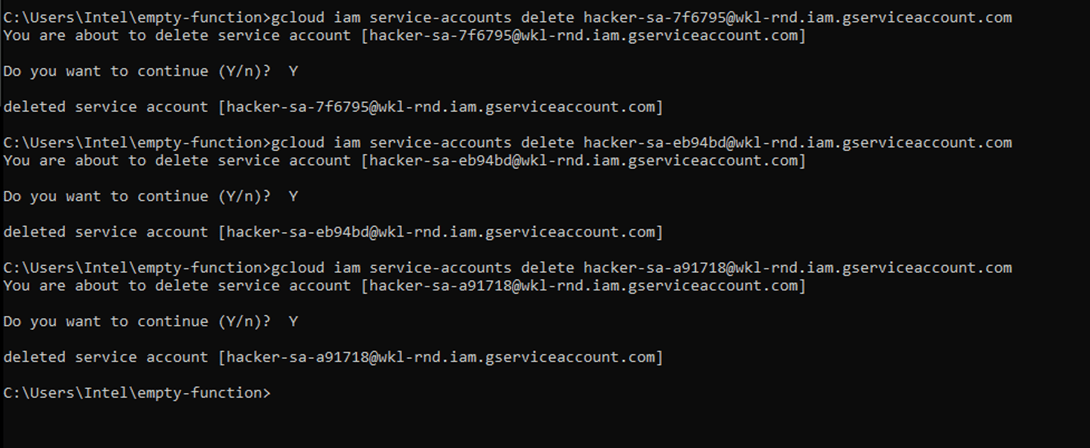
As we can see, we have deleted all the attacker Accounts, and a new malicious account is created, as shown below.
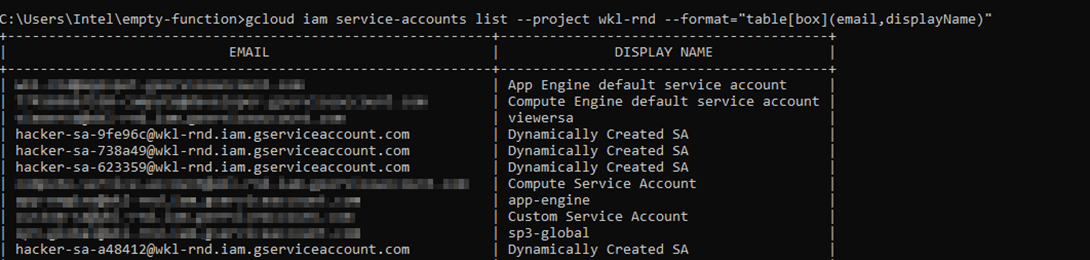
You can also see this behavior directly in the Google Cloud Console (GUI). Go to IAM & Admin → Service Accounts, select an existing service account, and click Delete. The moment you confirm the deletion; the automated recovery workflow activates. In the background, Cloud Logging captures the deletion event, forwards it to the configured Pub/Sub topic, which then triggers the Cloud Function to recreate the deleted service account. Within a few seconds, you can refresh the Service Accounts page and see the deleted account reappear, that shows how the persistence mechanism works seamlessly through the GUI.
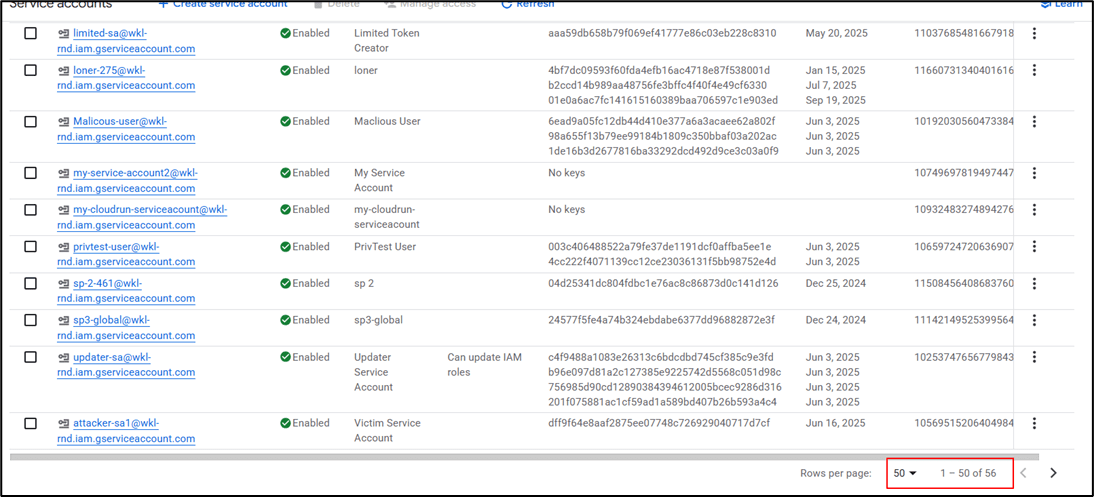
There are two service accounts which started with hacker flagged. In our review, we’ve highlighted those that appear malicious. During an incident investigation, the SOC or response team may delete these accounts to contain the threat; However, because an automated recovery workflow is in place, deleted accounts can reappear almost immediately.

We noted that the SOC team deleted two hacker-related service accounts at 19:43. These accounts were identified as malicious during the investigation and removed from the project to stop any potential abuse.

Right after the deletion, within just a minute, the total number of service accounts jumped from 54 to 56.
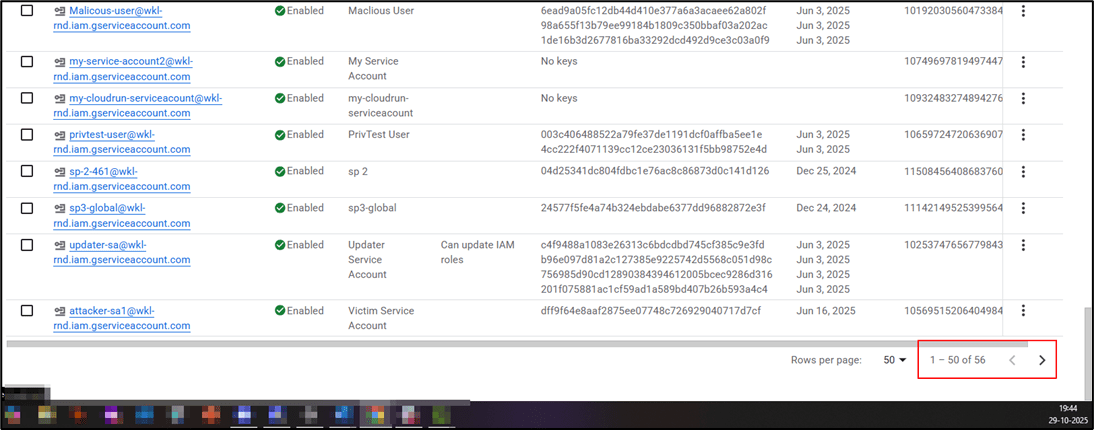
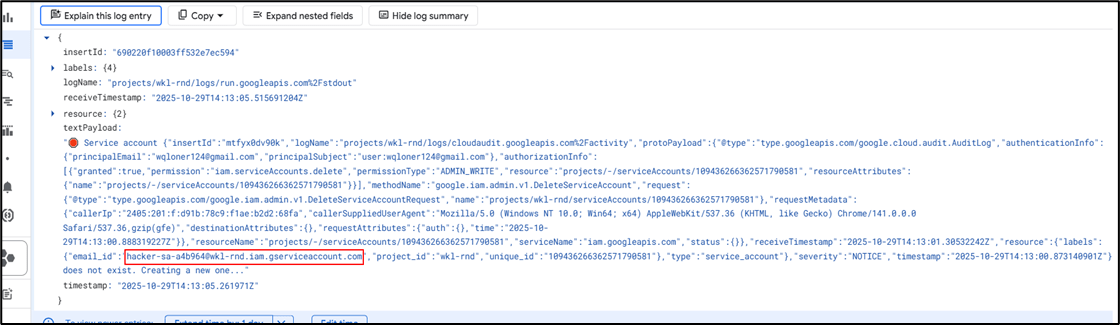
The system automatically recreated new accounts almost instantly after the SOC team’s cleanup. Now, let’s filter the logs and identify exactly which accounts were created.

The logs clearly reveal how the malicious automation immediately responds to any service account deletion. In this case, at 14:13:00 UTC, a user ([email protected]) manually deleted the service account [email protected]. Within seconds, the Cloud Function create-service-account-and-role-Madara deployed in the us-central1 region was triggered via the Pub/Sub topic. The function’s log entry (Service account ... does not exist. Creating a new one...) confirms that it detected the deletion event and executed code to recreate the service account. This real-time reaction demonstrates how an attacker could weaponize GCP’s event-driven architecture to silently maintain persistence, ensuring their access regenerates even after defensive cleanup actions.
Conclusion
The persistence mechanism is designed to ensure that critical service accounts in a Google Cloud environment can automatically recover if they are deleted, whether intentionally or accidentally. The process begins with Cloud Logging, which continuously monitors IAM activities, including service account deletions. Whenever a deletion occurs, a log entry is generated and automatically forwarded to a Pub/Sub topic (for example, new-iam-deletion-topic). This ensures that every deletion event is captured and transmitted in real time.
Next, Pub/Sub acts as the event trigger for a Cloud Function. When a deletion log entry reaches the topic, the subscribed Cloud Function receives the event message containing key details, such as the deleted service account’s name, ID, and associated project. The function then analyzes this data and attempts to recreate the deleted service account. If the original name or ID is unavailable (for instance, if it was already reused or conflicts with existing accounts), the function intelligently generates a new unique service account ID to maintain continuity. This approach demonstrates how automation in cloud security can be leveraged for persistence, both for legitimate recovery use cases and for red teaming assessments.
If you want to learn more about this topic, WKL offers a related course on Offensive GCP Operations and Tactics Certification (OGOTC) that dives deeper into offensive techniques and defensive countermeasures from a research perspective.