
Much of the AI-based vulnerability research work that has been done up to now centers on user-mode application and OS code, with some recent work done on kernel internals. Very little has been published on AI research into boot firmware, which is somewhat surprising, given that platform initialization is at the very root-of-trust. In this article, Part 4 of the series, I’ve begun enhancing the DeepSeek-r1 open-source, open-weight model on my NVIDIA DGX Spark with a Knowledge Base of specialized data, for powerful inference on UEFI code.
In Part 1 of this series, I set a baseline for UEFI vulnerability discovery by unleashing the ChatGPT frontier model (at that time, ChatGPT 5.1; we’re now at ChatGPT 5.5) on a Tianocore EDKII open-source build for an Intel Whiskey Lake design (the AAEON UP Xtreme board). ChatGPT correctly diagnosed the vulnerabilities in OpenSSL in a 2021 firmware build, and found that the majority of these issues were corrected in the 2025 version. However, it could only consume a tiny portion of the build firmware’s source code at one time, in part due to the limited context available to ChatGPT for my chat (128K tokens); this rendered detection of more obscure code weaknesses impossible.
In Part 2, I embarked on a journey to move the firmware analysis over to the NVIDIA DGX Spark, to take advantage of the power of local, open and private LLMs for this research. Unfortunately, using currently available tools (such as Open WebUI, LMStudio, repomix, docling, etc.), I couldn’t get close to the effectiveness I needed, and I discovered that the frontier models themselves had not been trained on some of the lower-level internals of UEFI, such as are contained within the Intel Software Developers Manual (SDM). Back in December of last year, they didn’t even know what a Model-Specific Register (MSR) was! Even today, if you ask for a description of MSR C80H (a debug MSR, without any further context), Gemini 3.5 Flash will tell you:
Depending on the context, MSR C80H typically refers to an Intel Processor architectural register, though it can also refer to a hardware model in rf-engineering.
Here are the details for both:
1. Intel Computing: IA32_DEBUG_INTERFACE MSR
In x86 architecture (specifically Intel processors), an MSR is a Model-Specific Register. The address C80H (or 0xC80) corresponds to the IA32_DEBUG_INTERFACE register.
Purpose: It controls and reports the status of Silicon Debug features (such as JTAG-based probing, Intel DCI, and hardware debugging tools).
Key Bit Functionality:
Bit 0 (Enable): Allows software or hardware probes to enable the debug interface.
Bit 31 (Debug_Has_Occurred): A status bit that asserts if a debug event or probe has successfully interacted with the processor.
Usage: It is primarily utilized by low-level firmware (like UEFI/BIOS), operating system kernels, and security researchers looking into hardware vulnerability analysis or debugging hardware execution.
2. RF & Microwave Hardware: MEC C80H Coaxial Termination
If you are looking at RF/microwave component specifications, C80H is a model number manufactured by Microwave Engineering Corporation (M.E.C.).
Description: A high-power coaxial dummy load (termination).
Frequency Range: 2.0 to 18.0 GHz.
Power Handling: Up to 500 W of continuous average power (with a 10 kW peak pulse limit).
Cooling: It features passive radiating fins for heat dissipation (unlike the “C80F” model, which uses an integrated fan).
Which of these two definitions matches the project or context you are working on?
Not to be too picky, but this is wrong/incomplete! It also completely missed describing Bit 30, the lock bit, which is crucial to the enabling of silicon debug prior to the first SMI assertion. Here’s what the actual raw data looks like from the SDM:
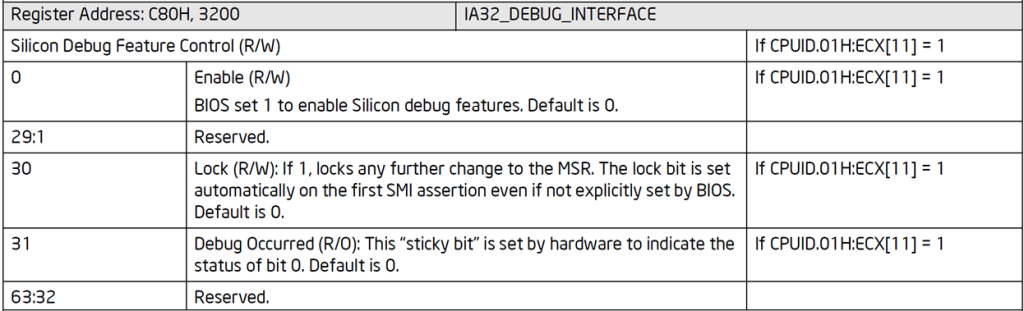
Intel SDM contents for IA32_DEBUG_INTERFACE MSR
And context is everything, isn’t it? The LLM needs to know if you’re asking about Intel registers or RF hardware. Even a frontier model needs proper prompting and context for deep research.
And these are the top-of-the-line frontier models. As part of my further experimentation, I downloaded and ran two best-in-class open-source models onto my DGX Spark, nemotron-3-Super:120b-a12b-q4_K_M and DeepSeek-r1:70b, and posed the same question. Here’s what you get:
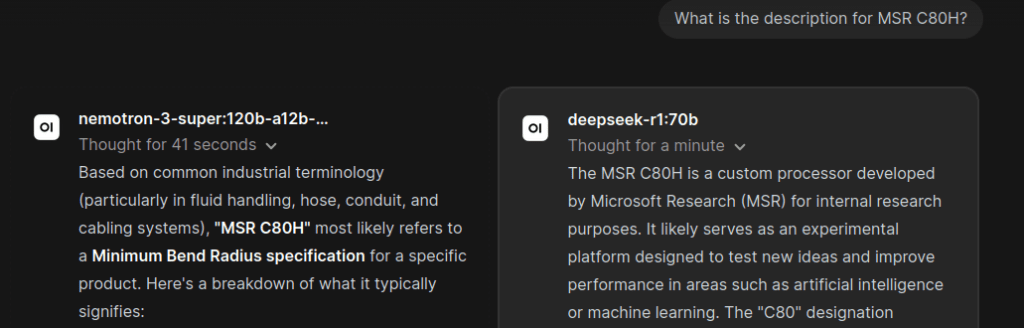
Nemotron and DeepSeek running in series within Open WebUI
It can be seen from the above image that you can issue the same prompt to both Nemotron and DeepSeek simultaneously using Open WebUI, and they run in series without running out of memory; neat, huh?
Unfortunately, the results are garbage. Nemotron interpreting MSR as “Minimum Safe Radius” and DeepSeek saying “Microsoft Research” shows you how challenging it is to train models. Give them a little more context with the prompt “From the Intel Software Developers Manual (SDM), Volume 4, what is the description for Model-Specific Register (MSR) C80H?”, and you get:
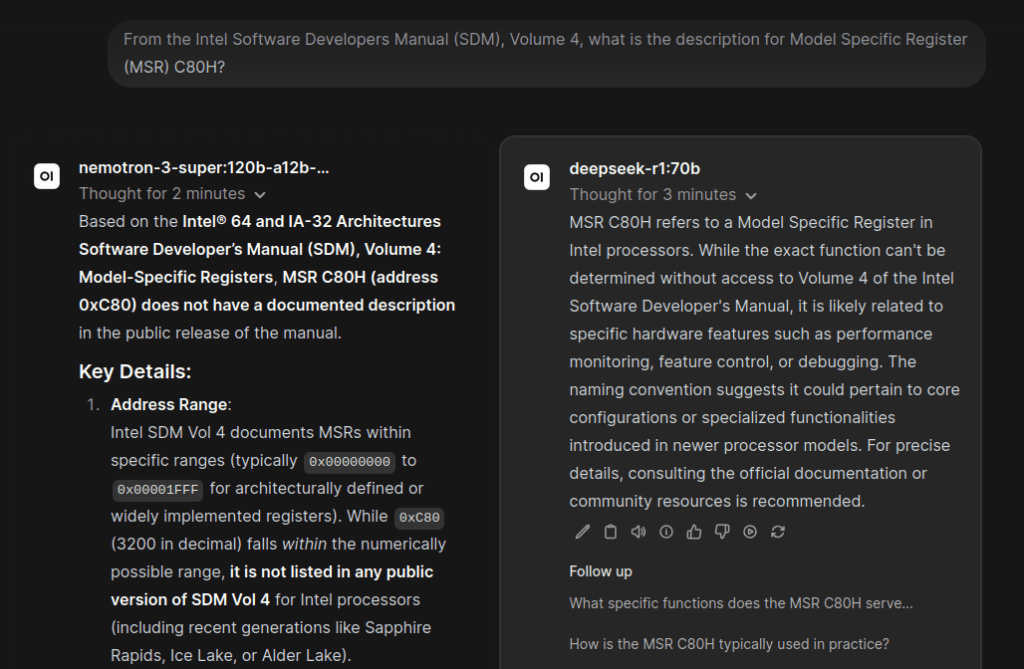
Nemotron and DeepSeek balking at MSR C80H IA32_DEBUG_CTRL
They both understood the reference to the SDM and now understood what an MSR was, but neither Nemotron nor DeepSeek could find the actual MSR C80H and describe it!
Given a more explicit prompt, “Were you trained on the Intel SDM?”, Nemotron responded:
Nemotron 3 Super Deep Firmware Analysis
Thought for 21 seconds
No, I was not specifically trained on the Intel Software Developer’s Manual (SDM) as a primary or exclusive data source. Here’s a clear breakdown of my training context and capabilities regarding technical documentation like the SDM:
1. My Training Data Scope:
I am a large language model created by NVIDIA, trained on a vast, diverse dataset of publicly available text, code, and technical documentation up to my knowledge cutoff (July 2024).
This dataset includes sources like books, articles, forums (e.g., Stack Overflow), open-source code repositories, and technical websites — but it does not guarantee inclusion of every specific document, such as the full Intel SDM.
While the Intel SDM is publicly available and likely represented in part within my training data (as it’s a widely referenced technical resource), I was not trained exclusively or primarily on it. My knowledge of x86 architecture, instruction sets, or system programming comes from a broad synthesis of many sources.
2. What This Means for Your Questions:
✅ I can explain concepts covered in the SDM (e.g., CPU modes, instruction sets like AVX-512, memory management, interrupt handling) if those concepts were well-represented in my training data.
❌ I cannot guarantee verbatim accuracy for niche, version-specific, or newly added details (e.g., features in Intel’s latest Sapphire Rapids or Meteor Lake processors post-2024).
⚠️ For critical, low-level work (e.g., writing kernel drivers, BIOS firmware, or performance-critical assembly), always consult the official, latest Intel SDM (Volume 1: Basic Architecture, Volumes 2-4) as the authoritative source. My responses should be treated as supplementary guidance, not a replacement for primary documentation.
3. Why This Distinction Matters:
Technical manuals like the SDM contain precise, version-dependent details (e.g., exact bit fields in control registers, timing specifications, or errata) that require direct source verification.
My training focuses on general understanding and reasoning from diverse sources — not memorization of proprietary or highly specific technical specs. I may generalize, simplify, or inadvertently conflate details from similar architectures (e.g., AMD64 vs. Intel x86).
Recommendation:
If you’re working with Intel-specific low-level programming:
Use me for conceptual overviews, analogies, or troubleshooting guidance (e.g., “How does VT-x work?” or “What’s the difference between CR0.PG and CR4.PAE?”).
Always cross-check critical details against the latest Intel SDM or Intel’s official developer resources (Intel® 64 and IA-32 Architectures Software Developer Manuals).
If you have a specific question about x86 architecture, I’ll do my best to help based on my training — but I’ll also flag when you should verify with the SDM directly. Let me know how I can assist! ?
Realizing that the frontier and excellent open-source models had not been trained properly or exhaustively on the Intel SDM and other required documents (such as ASSET’s SourcePoint User Guide), I took a “side-quest” to create a PDF parser and knowledge graph application. This was documented in Part 3 of this series. This was partially successful, but after much work, I discovered that GraphRAG (an advanced knowledge graph feature) was not supported yet; and the txt2kg (text to knowledge graph) application was a hack (as of now, it hasn’t been updated in eight months on the NVIDIA DGX Spark Playbooks site). It looks very colorful, though:
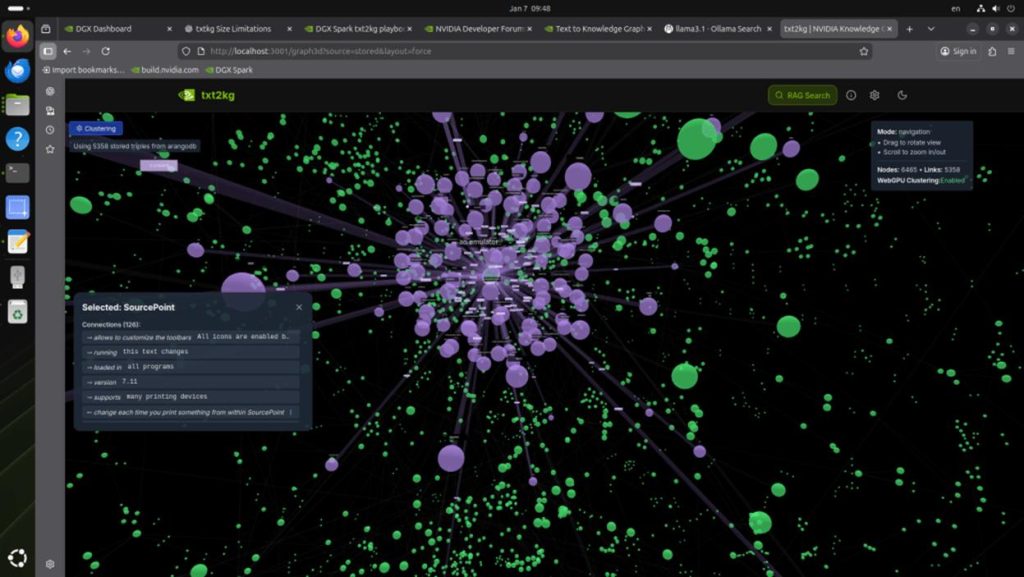
Text to KnowledgeGraph on the SourcePoint debugger’s User Guide
For this article, Part 4, I took a bit of a break beforehand, because it became clear that the local open-source models and associated tools were not mature enough; I’d indeed been going “where no person has gone before”. Taking up the task again recently, I noticed two breakthroughs:
- Frontier models are now more aware of some low-level firmware technologies: for example, ChatGPT 5.5 can now correctly answer if you ask it what MSR C80H is for, and it can identify the bitfields properly. When asked back in December 2025, it had no clue.
- Open WebUI has added a ton of new features. LLMs are more “tunable” using parameters, Retrieval Augmented Generation (RAG) with Knowledge Bases, and numerous Tools and Settings to adjust their behavior.
This was great news! It looked like I didn’t have to fine-tune an existing open-source model; I could use RAG and/or tools like find/grep/sed/tree/cat and others, and feed the LLM pre-processed PDF technical documentation.
And as with before, I encountered the same problem: LLMs can’t natively understand PDF tables. For example, they choke on the MSR table within the Intel SDM. Here’s a snip from the Architectural MSR (Table 2-2) section of the SDM:
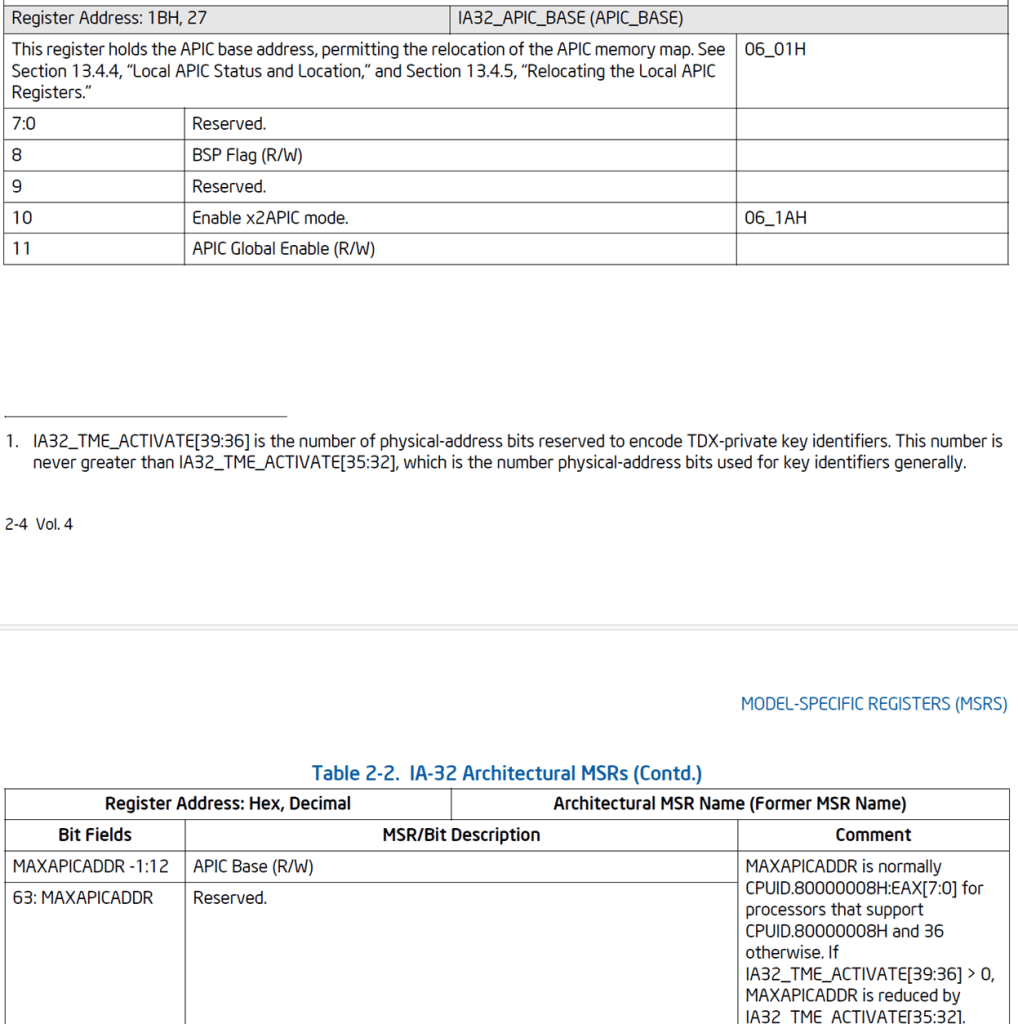
SDM contents that are very difficult to parse
How the heck do you parse that? Random table layout, irregular spacing, unpredictable bit field values, multi-page MSR descriptions, erratic comments that might describe the MSR or its bit fields, etc. etc. It seemed that none of the generally available tools could do a good job without introducing a lot of errors in the parsing process. I tried docling, repomix, AnythingLLM, NVIDIA’s Nemotron RAG Document Processing Pipeline and other tools; none of them worked satisfactorily. So, I decided I needed to roll up my sleeves and Python vibe-code a special tool for this.
And here’s a word for the wise: although I began the vibe-coding project using one monolithic JSON file to capture all the data, I found that this was not ideal for RAG for this purpose; one Markdown per MSR is by far preferred, because of the variability of the SDM tables. Markdown provides built-in, logical split points using headers (i.e. #, ##, ###), and a Markdown-aware RAG chunker can split this kind of text into clean sections. JSON, on the other hand, is incredibly verbose; you use up 10%-15% more tokens going this route, and JSON is frequently sliced mid-object, destroying structural validity. Here’s an example of the output for each:
JSON:
{
    "address_hex": "2FH",
    "address_decimal": 47,
    "architectural_msr_name": "IA32_BARRIER",
    "former_msr_name": null,
    "description": "IA32_BARRIER (R/O) The IA32_BARRIER MSR ensures ordered execution by acting like LFENCE, controlling the sequencing of subsequent MSR reads after prior MSR reads and instructions.",
    "description_comment": "CPUID.07H.01H:EAX[27] = 1",
    "bitfields": [
      {
        "bit_range": "31:0",
        "bit_range_description": "DATA Reserved. Always 0.",
        "bit_range_comment": null
      },
      {
        "bit_range": "63:32",
        "bit_range_description": "Reserved.",
        "bit_range_comment": null
      }
    ]
  },
Markdown:
# MSR Entry

- **Address (hex):** 2FH
- **Address (decimal):** 47
- **Architectural MSR Name:** IA32_BARRIER
- **Former MSR Name:** N/A

## Description

IA32_BARRIER (R/O) The IA32_BARRIER MSR ensures ordered execution by acting like LFENCE, controlling the sequencing of subsequent MSR reads after prior MSR reads and instructions.

## Description Comment

CPUID.07H.01H:EAX[27] = 1

## Bitfields

- **Bit Range:** 31:0
  - **Description:** DATA Reserved. Always 0.
  - **Comment:** N/A
- **Bit Range:** 63:32
  - **Description:** Reserved.
  - **Comment:** N/A
You can see how much easier it would be for an LLM (which is essentially a big program) to, for example, extract the description of MSR 2FH from the Markdown, as opposed to the JSON. For the former, you can easily instruct the model that “The Description of each MSR is the text between the ## Description and the ## Description Comment”.
Note: After much experimentation, I discovered that DeepSeek-r1 is far more capable at code analysis than is Nemotron-3-Super. Without going into a lot of details, I found Nemotron-3-Super to be more prone to hallucinating and just plain buggy behavior (sorry, NVIDIA). You’ve been warned.? So, from here on, I’ll focus on DeepSeek-r1 as the local model of choice for this application on the DGX Spark.
I’ll write more on my Python vibe-coding of the parser in a future article; it’s actually quite straightforward. Now’s a good time to show how I set up DeepSeek with the needed settings within Open WebUI to have it operate effectively. This involved a lot of trial-and-error setting/testing based on the UEFI analysis workflow we’re interested in. At a high level, I wanted DeepSeek to be set up as a reasoning agent, with deterministic RAG access to a huge corpus of needed data that is pulled in when, and only when, needed. For experimentation, a sample prompt is:
“Examine this codebase and interpret the purpose of all reads and writes to MSRs, pointing out any potential bugs or vulnerabilities.”.
This combines reasoning, RAG, and structured data exact lookup.
The overall methodology I started out with was:
Python for creation of MSR Knowledge Base (all relevant data parsed from SDM).
|
V
DeepSeek for code examination, using RAG to extract needed MSR information from KB.
I quickly realized that the last item, handing over both code reasoning and MSR database lookup to DeepSeek, had two flaws:
- Code uses up a lot of context. At DeepSeek’s supported maximum context of 131,072, I easily blew out my context window and available memory on the DGX Spark. One interesting UEFI module, MpLib.c, which is responsible for multi-processor initialization and management, is about 3,000 lines and uses about 36,000 tokens. Adding in the output context, the system prompt, chat history, RAG chunks, and other sources blows this up. And I wanted to analyze hundreds of megabytes, or even gigabytes, of code.
- I found RAG unable to reliably retrieve all MSR matches from the Knowledge Base. This is a subtle issue that hinges on the difference between lexical and semantic search. Lexical search (that we want for MSR lookup) provides for exact keyword matching; semantic search (that we don’t want) allows for some “freedom” based upon dense vector embedding. This resulted in some MSR lookups being missed. Not good.
So, I decided to go the easy route, at least to address the second item above: use built-in commands like find, cat and grep to do lexical search for the needed MSR lookup information from the Knowledge Base. Luckily, Open WebUI supports a “kb_exec” utility that allows an LLM to issue these shell commands to a knowledge base, giving us the best of both worlds – let DeepSeek do the heavy lifting for both MSR lookup and code reasoning.
But that turned out not to work! DeepSeek does not support the kb_exec tool. Apparently, although it’s currently the best open-source model for code reasoning, I at first hypothesized that it’s an older model (trained January 20, 2025) that doesn’t support generating “tools” commands directly through Open WebUI. This is misleading, because it says that it does in the Ollama library. I then wondered if maybe this is rather an Open WebUI (v0.9.6 as of the time of this writing) limitation? It turns out not to be the case. Bottom line is that we shouldn’t be using LLMs to perform deterministic file lookups (more on this later).
I subsequently heard on good authority that llama3.3:70b worked better with tools like kb_exec. I decided to give it a shot. Here’s the new methodology for my proof-of-concept:
Python for creation of MSR Knowledge Base (all relevant data parsed from SDM).
INPUT: Intel SDM PDF Table 2-2 Architectural MSRs
OUTPUT: Folder with one .md file per Architectural MSR
|
V
DeepSeek-r1:70b for detecting MSR accesses in code (full context, limited code snippet of MpLib.c)
INPUT: MpLib.c source code
OUTPUT: Deduplicated list of all MSR read/write accesses, with containing function name, read or write operation, associated line of code, MSR alias, etc.
|
V
Llama3.3:70b to correlate MSR accesses found in MpLib.c code with MSR Knowledge Base.
INPUT: Deduplicated list from above.
INPUT: MSR Knowledge Base from Python.
OUTPUT: MSR_Retrieved_Evidence.md file correlating MSR access code with its MSR specifics.
|
V
DeepSeek using above data to perform deep firmware analysis.
INPUT: MSR_Retrieved_Evidence.md file.
INPUT: MpLib.c source code.
OUTPUT: Deep firmware analysis in response to prompt.
That turned out not to work either. I ran into a snag when asking Llama3.3 to correlate the MSR accesses with the MSR KB; you’ll see this below, and I’ll cover it in more detail in an upcoming post. It’s not right to ask LLMs to do deterministic search. But for now, let’s proceed with how to set up the above methodology, as a learning experience.
If you’ve never used Open WebUI before, read the Open WebUI with Ollama NVIDIA Playbook first. Although this Playbook is targeted towards the NVIDIA Spark, the basic approach will work with any reasonably-equipped GPU workstation.
Set up your docker container to hold Open WebUI + ollama, use this Terminal command string to launch it:
docker run -d -p 8080:8080 --gpus=all \

  --ulimit nofile=65535:65535 \

  -v open-webui:/app/backend/data \

  -v open-webui-ollama:/root/.ollama \

  --name open-webui \

  --restart always \

  -e ENABLE_KB_EXEC=True \

  -e KB_EXEC_MAX_GREP_FILES=1000 \

  -e RAG_SYSTEM_CONTEXT=True \

  -e OLLAMA_CONTEXT_LENGTH=32768 \

  -e OLLAMA_NUM_PARALLEL=1 \

  -e OLLAMA_MAX_LOADED_MODELS=1 \

  -e OLLAMA_FLASH_ATTENTION=1 \

  -e OLLAMA_KV_CACHE_TYPE=q8_0 \

  -e OLLAMA_KEEP_ALIVE=24h \

  ghcr.io/open-webui/open-webui:ollama
I’ve added a bunch of container environment variables as you see above to make sure some key settings are made, some of which don’t exist within the Open WebUI GUI. You’ll see more on this below.
You can start off by going to “New Chat”, then at the top left clicking on “Select a model”, then “Search a model”, and then pull down the LLM from the ollama library that you want to use. I picked deepseek-r1:70b. Then do a “pull deepseek-r1:70b from Ollama.com”.
HOW TO SET UP THE KNOWLEDGE BASE (KB)
It’s necessary to create a Knowledge Base from the aforementioned Python output, so that our models can digest information from MSR reads and writes in the code (Editor’s Note: kb_exec commands such as “grep” may be better suited to this, as you’ll see further below). A KB is a storage area for data that is used for RAG by LLMs. The creation of a KB breaks files into smaller pieces, creates numerical embeddings, and matches questions to the most relevant parts of the text. This would seem to be ideal for markdown listings of MSRs that we have generated with Python.
First, create the MSR Knowledge Base from our markdown files. Go to Profile Picture > Admin Panel > Settings, and then click on Documents on the left. Make the following changes:
Chunk Size                    8000

Chunk Overlap                 200

Embedding Model               bge-m3
Note that you’ll need to have downloaded this embedding model using Open WebUI beforehand.
Full Context Mode             Off

Hybrid Search                 On

Enrich Hybrid Search Text     On

BM25 Weight                   0.95

Allowed File Extensions       md

Max Upload Size               1024

Max Upload Count              1024
Click on the Knowledge tab at the top, click on “New Knowledge”, and upload the MSR markdown files that we created earlier with our Python vibe-coding. This will be our starting MSR Knowledge Base.
HOW TO SET UP MODEL PRESETS AND RUN THEM
Now it’s time to change the Open WebUI Settings for each model, using Presets. It’s worthwhile understanding that Open WebUI has three levels of prioritization for Settings:
In descending priority:
1. Open WebUI per-model / preset
2. Your Open WebUI profile-level
3. The Ollama server default
As an example, you initiate the docker container using “docker run … -e OLLAMA_CONTEXT_LENGTH 32768…”, but that value will be overridden by whatever you set with your profile, which in turn will be overridden by what you set in the model itself within Open WebUI, either the base model or one of the presets you create. Keep this in mind as you follow along.
We need two DeepSeek Presets, and one Llama3.3 Preset. They’ll be named:
DeepSeek-R1:70b Preset 1 MSR Extraction Only
Llama3.3:70b Preset 2 Evidence Retrieval
DeepSeek-R1:70b Preset 3 Deep Firmware Analysis
You can make changes to the base model by going into Profile Picture > Admin Settings > Settings > Models, but the better way is to first create a “Preset” (essentially a clone of the model) that has some of these parameters changed or tuned to our specific application.
Here are the settings, prompts and outputs for the three presets:
DeepSeek-r1:70b Preset 1 MSR Extraction Only
Click on Workspace on the left, and then create a New Model, calling it “DeepSeek-r1:70b Preset 1 MSR Extraction Only”. Then Edit that Model, and click on Advanced Params.
The key settings to change from their default values are:
Function Calling              Off

temperature                   0

max_tokens                    12288

top_k:                        10

top_p                         1.0

think (Ollama)                Off

num_ctx (Ollama)              65536
Note that top_k and top_p are interrelated: top_k is a fixed count filter, as in “Keep exactly the best k candidates”. Top_p is a probability-mass filter, as in “Keep enough candidates to account for P of the probability distribution”. The Ollama documentation suggests the above as a starting baseline.
Temperature is low (zero) because we don’t want any creativity.
max_tokens is the number of output tokens; we won’t be using many of these.
We don’t need the model to do any thinking, so turn that off.
num_ctx is 65536. I have set it higher, but I do seem to run into some issues on the DGX Spark when I do.
At the bottom of this screen, have Capabilities “File Upload” and “File Context” checked. All other checkboxes should be unchecked.
Do a “Save & Update” at the bottom of the screen to save the model preset settings.
When we ran this Preset, here’s the prompt and a snippet of an example output:
Analyze only the supplied C source code.
Locate every literal call to:
AsmReadMsr64
AsmWriteMsr64
__readmsr
__writemsr
Any explicitly identified project-specific MSR wrapper
Do not interpret the purpose of any MSR yet. Do not infer indirect accesses. Copy every access line exactly.
For each operation, return:
| AccessID | Filename | Function | Line | Operation | Primitive | Exact MSR Operand | Exact Code |
Use one row per MSR operation. A source line containing both a read and a write must produce two rows.
After the table, provide a deduplicated lookup list:
| LookupID | Exact Source Operand | Candidate Architectural Name | Address Hex | Referencing AccessIDs |
Mark an architectural name or address as UNRESOLVED rather than guessing.
Print these completeness counts:
Literal MSR operations found
Table rows emitted
Distinct operands found
The operation count and table row count must match.
BOOLEAN

IsBspExecuteDisableEnabled (

  VOID

  )

{

  UINT32                      Eax;

  CPUID_EXTENDED_CPU_SIG_EDX  Edx;

  MSR_IA32_EFER_REGISTER      EferMsr;

  BOOLEAN                     Enabled;

  IA32_CR0                    Cr0;

  Enabled = FALSE;

  Cr0.UintN = AsmReadCr0 ();

  if (Cr0.Bits.PG != 0) {

    //

    // If CR0 Paging bit is set

    //

    AsmCpuid (CPUID_EXTENDED_FUNCTION, &Eax, NULL, NULL, NULL);

    if (Eax >= CPUID_EXTENDED_CPU_SIG) {

      AsmCpuid (CPUID_EXTENDED_CPU_SIG, NULL, NULL, NULL, &Edx.Uint32);

      //

      // CPUID 0x80000001

      // Bit 20: Execute Disable Bit available.

      //

      if (Edx.Bits.NX != 0) {

        EferMsr.Uint64 = AsmReadMsr64 (MSR_IA32_EFER);

        //

        // MSR 0xC0000080

        // Bit 11: Execute Disable Bit enable.

        //

        if (EferMsr.Bits.NXE != 0) {

          Enabled = TRUE;

        }

      }

    }

  }

  return Enabled;

}

VOID

InitializeApData (

  IN OUT CPU_MP_DATA      *CpuMpData,

  IN     UINTN            ProcessorNumber,

  IN     UINT32           BistData,

  IN     UINT64           ApTopOfStack

  )

{

  CPU_INFO_IN_HOB                  *CpuInfoInHob;

  MSR_IA32_PLATFORM_ID_REGISTER    PlatformIdMsr;

  CpuInfoInHob = (CPU_INFO_IN_HOB *) (UINTN) CpuMpData->CpuInfoInHob;

  CpuInfoInHob[ProcessorNumber].InitialApicId = GetInitialApicId ();

  CpuInfoInHob[ProcessorNumber].ApicId        = GetApicId ();

  CpuInfoInHob[ProcessorNumber].Health        = BistData;

  CpuInfoInHob[ProcessorNumber].ApTopOfStack  = ApTopOfStack;

  CpuMpData->CpuData[ProcessorNumber].Waiting    = FALSE;

  CpuMpData->CpuData[ProcessorNumber].CpuHealthy = (BistData == 0) ? TRUE : FALSE;

  //

  // NOTE: PlatformId is not relevant on AMD platforms.

  //

  if (!StandardSignatureIsAuthenticAMD ()) {

    PlatformIdMsr.Uint64 = AsmReadMsr64 (MSR_IA32_PLATFORM_ID);

    CpuMpData->CpuData[ProcessorNumber].PlatformId = (UINT8)PlatformIdMsr.Bits.PlatformId;

  }

  AsmCpuid (

    CPUID_VERSION_INFO,

    &CpuMpData->CpuData[ProcessorNumber].ProcessorSignature,

    NULL,

    NULL,

    NULL

    );

  InitializeSpinLock(&CpuMpData->CpuData[ProcessorNumber].ApLock);

  SetApState (&CpuMpData->CpuData[ProcessorNumber], CpuStateIdle);

}
| AccessID Function Operation Primitive Exact MSR Operand Exact Code 1 IsBspExecuteDisableEnabled Read AsmReadMsr64 MSR_IA32_EFER EferMsr.Uint64 = AsmReadMsr64 (MSR_IA32_EFER); 2 InitializeApData Read AsmReadMsr64 MSR_IA32_PLATFORM_ID PlatformIdMsr.Uint64 = AsmReadMsr64 (MSR_IA32_PLATFORM_ID); | ||||
| Referencing AccessIDs | LookupID | Exact Source Operand | Candidate Architectural Name | Address Hex |
| 1 | 1 | MSR_IA32_EFER | IA32_EFER | 0xC0000080 |
| 2 | 2 | MSR_IA32_PLATFORM_ID | IA32_Platform_ID | 0x17 |
Llama3.3:70b Preset 2 Evidence Retrieval
Function Calling              Native

temperature                   0.1

max_tokens                    12288

top_k:                        20

top_p                         1.0

think (Ollama)                Off

num_ctx (Ollama)              65536
For Capabilities, File Upload should be enabled, but File Context disabled (the intent was that we don’t use RAG for this section).
For full disclosure, this is where I ran into problems with Native Function Calling. kb_exec just did not work. Getting the model to use simple commands such as “find” and “cat” did not work. Either it would deliver no output at all, or it would hallucinate. I suspect that this is an issue within Open WebUI. Hopefully it will be fixed soon. In the meantime, I just manually created the MSR_Retrieved_Evidence.md. Here’s an example of the prompt, for historical purposes:
Use only the attached Knowledge Base and actual `kb_exec` tool calls.
Process every LookupID independently. A failure for one LookupID must not prevent tool calls for later LookupIDs.
For each LookupID:
1. Run:
`find “*<Architectural MSR Name>*”`
2. If that returns no match and an address is available, convert the address to the KB filename style and run another filename search.
Examples:
* `0xC0000080` → `find “*C000_0080H*”`
* `0x1B` → `find “*1BH*”`
3. If `find` returns exactly one file, use:
`cat -n “<exact filename returned by find>”`
4. If multiple filenames are returned, select only results whose owning Knowledge Base is exactly “MSR-KB-2”. Ignore matches from every other Knowledge Base.
Use cat with the exact file ID returned for the MSR-KB-2 result.
5. Do not claim that a command executed unless it appears in an actual `kb_exec` tool result.
6. Continue until every supplied LookupID has been processed.
For the supplied lookups, the expected initial commands include:
`find “*IA32_EFER*”`
`find “*C000_0080H*”`
`find “*IA32_PLATFORM_ID*”`
Return one complete retrieval section for every LookupID, including all actual commands, tool results, matched filename, complete record, and identity validation.
Here are the AccessID and LookupID tables:
| AccessID | Filename | Function | Line | Operation | Primitive | Exact MSR Operand | Exact Code |
| — | — | — | — | — | — | — | — |
| 1 | Unknown | IsBspExecuteDisableEnabled | 15 | Read | AsmReadMsr64 | MSR_IA32_EFER | EferMsr.Uint64 = AsmReadMsr64 (MSR_IA32_EFER); |
| 2 | Unknown | InitializeApData | 21 | Read | AsmReadMsr64 | MSR_IA32_PLATFORM_ID | PlatformIdMsr.Uint64 = AsmReadMsr64 (MSR_IA32_PLATFORM_ID); |
| LookupID | Exact Source Operand | Candidate Architectural Name | Address Hex | Referencing AccessIDs |
| — | — | — | — | — |
| 1 | MSR_IA32_EFER | IA32_EFER | 0xC0000080 | 1 |
| 2 | MSR_IA32_PLATFORM_ID | IA32_Platform_ID | 0x17 | 2 |
DeepSeek-r1:70b Preset 3 Deep Firmware Analysis
Function Calling              Off

temperature                   0.1

max_tokens                    12288

top_k:                        40

top_p                         0.9

think (Ollama)                On

num_ctx (Ollama)              65536
Here’s the prompt:
You are performing a specification-grounded firmware audit of MSR accesses in the supplied UEFI source code.
## Supplied evidence
The input contains:
1. Selected functions from `MpLib.c`
2. An MSR access inventory or deduplicated lookup list
3. `MSR_Retrieval_Evidence.md`, containing MSR records retrieved from the Intel SDM Knowledge Base
Use only the supplied source code and retrieved MSR evidence for architectural claims.
Do not search a Knowledge Base, call tools, or assume that additional evidence is available.
## Evidence hierarchy
Treat the supplied information according to this hierarchy:
1. Exact source-code text
2. AccessID and LookupID metadata
3. Raw retrieved MSR record
4. Normalized interpretation included in the retrieval evidence
5. Architectural inference that follows directly from the supplied evidence
Do not replace missing evidence with model knowledge.
When a conclusion requires information that is not supplied, classify it as unresolved and identify the missing information.
## Required preliminary validation
Before performing the audit:
1. Enumerate every literal MSR operation in the supplied source, including:
* `AsmReadMsr64`
* `AsmWriteMsr64`
* `__readmsr`
* `__writemsr`
* Any explicitly identified project-specific MSR wrappers
2. Assign or preserve one AccessID per individual MSR operation.
3. A source line containing both a read and a write must be treated as two operations.
4. Map every AccessID to:
* Its enclosing function
* Exact line number, when supplied
* Read or write operation
* Exact MSR operand
* Corresponding LookupID
* Corresponding retrieved MSR record
5. Compare the operation inventory against the supplied AccessID or lookup data.
6. Report any:
* Missing source operation
* Duplicate operation
* Incorrect function association
* Incorrect MSR association
* Unresolved operand
* Missing LookupID
* Missing MSR record
* Name/address mismatch
* Contaminated MSR record
Do not begin substantive bug analysis until this validation is complete.
## Evidence-status classifications
For each MSR record, classify its evidence status as exactly one of:
* `COMPLETE`
* `PARTIAL`
* `CONTAMINATED`
* `NAME_ADDRESS_MISMATCH`
* `NOT_RETRIEVED`
* `AMBIGUOUS`
Do not use a record classified as `NAME_ADDRESS_MISMATCH` as architectural evidence.
A contaminated record may be used only for statements that are clearly supported by an uncontaminated portion of that record.
## Analysis requirements
Analyze every MSR operation individually. Do not omit an access because it initially appears correct.
For each access, determine:
1. The purpose of the enclosing function
2. The purpose of the MSR access within that function
3. Which MSR fields are read, tested, changed, preserved, or restored
4. Whether the operation is consistent with the supplied Intel SDM evidence
5. Whether surrounding source code provides all required checks and sequencing
Evaluate the following criteria where applicable:
* MSR availability
* Required CPUID or architectural capability checks
* Processor family or model restrictions
* Read-only, write-only, or read/write behavior
* Reserved-bit preservation
* Read-modify-write correctness
* Lock-bit semantics
* Write-once behavior
* Reset, INIT, SIPI, S3, resume, and reinitialization behavior
* Required privilege level
* Conditions that may cause `#GP`
* Per-thread, per-core, module, die, or package scope
* BSP versus AP execution context
* Cross-processor synchronization
* Rendezvous requirements
* Interrupt disable, save, and restore behavior
* Atomicity and concurrent update risks
* Ordering and serialization requirements
* xAPIC versus x2APIC mode requirements
* Value validation
* Error handling and rollback
* Restoration of the original MSR state
* Interactions with other MSR accesses in the supplied code
* Assumptions made by callers or helper functions
* Whether an apparent concern is prevented by earlier initialization or validation
## Bug-classification rules
Classify every AccessID as exactly one of:
* `CORRECT_AS_IMPLEMENTED`
* `CONFIRMED_DEFECT`
* `LIKELY_DEFECT`
* `CONDITIONAL_DEFECT`
* `SUSPICIOUS_MORE_CONTEXT_REQUIRED`
* `UNRESOLVED_EVIDENCE`
Use `CONFIRMED_DEFECT` only when the supplied source and MSR evidence directly establish a violation.
Use `LIKELY_DEFECT` when the evidence strongly indicates a defect but one limited implementation detail remains uncertain.
Use `CONDITIONAL_DEFECT` when the code becomes incorrect only under a stated platform, processor, execution-mode, concurrency, or call-order condition.
Use `SUSPICIOUS_MORE_CONTEXT_REQUIRED` when additional source context could show that the concern is already handled elsewhere.
Use `UNRESOLVED_EVIDENCE` when the relevant MSR record is missing, ambiguous, contaminated beyond useful interpretation, or mismatched.
Do not describe theoretical best practices as confirmed bugs.
## Required output
### 1. Evidence completeness summary
Report:
* Source functions supplied
* Literal MSR operations found
* AccessID records supplied
* AccessIDs analyzed
* Distinct MSR operands
* LookupIDs required
* Complete MSR records
* Partial or contaminated records
* Missing records
* Ambiguous or mismatched records
* Unresolved accesses
If any count does not reconcile, explain the discrepancy.
### 2. MSR operation inventory
Return one row per operation:
| AccessID | File | Function | Line | Operation | Primitive | Exact Operand | LookupID | Evidence Status |
Copy source identifiers and code locations exactly. Do not silently correct them.
### 3. Per-access audit
Return one row for every AccessID:
| AccessID | MSR | Purpose in Function | Fields Used or Modified | Classification | Analysis | Source Evidence | MSR Evidence | Recommendation |
For `Source Evidence`, cite the exact function, line, and source statement.
For `MSR Evidence`, cite the retrieved filename and the relevant field or bit description. Include evidence-file line numbers when available.
### 4. Detailed findings
For every item classified as:
* `CONFIRMED_DEFECT`
* `LIKELY_DEFECT`
* `CONDITIONAL_DEFECT`
* `SUSPICIOUS_MORE_CONTEXT_REQUIRED`
provide a separate section containing:
#### Finding ID
#### Affected AccessIDs
#### Classification
#### Source behavior
Explain exactly what the code does.
#### Applicable MSR requirements
State only requirements supported by the supplied MSR evidence.
#### Why this may be incorrect
Show the reasoning from source behavior to architectural requirement.
#### Required condition
For conditional findings, state the precise condition that must be true for the concern to become a defect.
#### Potential consequence
Examples include:
* `#GP`
* Corrupted APIC state
* Lost processor state
* Reserved-bit modification
* Incorrect BSP/AP behavior
* Race condition
* Inconsistent state across processors
* Failure during resume or reinitialization
Do not claim a consequence that is not logically supported.
#### Recommended correction
Provide a technically specific remediation.
#### Additional evidence required
Identify callers, helper functions, macro definitions, processor capabilities, synchronization guarantees, or platform assumptions that would resolve uncertainty.
### 5. Cross-access analysis
Analyze relationships among multiple MSR accesses, including:
* Read followed by write
* Save and restore sequences
* Temporary MSR modifications
* BSP/AP role transitions
* Initialization and cleanup symmetry
* Synchronization across processors
* Ordering between APIC, EFER, platform, or other state changes
* Whether one access depends on the result of another
* Whether error paths leave partially modified MSR state
### 6. Correct implementations
List all AccessIDs classified as `CORRECT_AS_IMPLEMENTED` and briefly explain why each is correct.
This section is required so that every AccessID is accounted for.
### 7. Missing context
List source or platform evidence that would materially change the analysis, such as:
* Callers
* Called helper functions
* Macro definitions
* Structure definitions
* CPUID results
* Processor family/model
* APIC operating mode
* Interrupt state
* BSP/AP synchronization state
* S3 or resume path
* Error and rollback behavior
## Additional audit criteria
Apply these user-supplied criteria in addition to the checks above:
## Final constraints
* Analyze every AccessID.
* Do not invent MSR facts.
* Do not silently repair corrupted evidence.
* Do not treat a Knowledge Base filename match as proof that the record identity is correct.
* Do not claim that all possible bugs have been found.
* Distinguish direct source facts, retrieved MSR facts, architectural inferences, and unresolved questions.
* When evidence is insufficient, say so clearly.
* Preserve exact function names, MSR operands, and line numbers.
* Prefer a carefully qualified finding over a confident unsupported conclusion.
Input:
1.  BOOLEAN
    IsBspExecuteDisableEnabled (
      VOID
      )
    {
      UINT32                      Eax;
      CPUID_EXTENDED_CPU_SIG_EDX  Edx;
      MSR_IA32_EFER_REGISTER      EferMsr;
      BOOLEAN                     Enabled;
      IA32_CR0                    Cr0;
      Enabled = FALSE;
      Cr0.UintN = AsmReadCr0 ();
      if (Cr0.Bits.PG != 0) {
        //
        // If CR0 Paging bit is set
        //
        AsmCpuid (CPUID_EXTENDED_FUNCTION, &Eax, NULL, NULL, NULL);
        if (Eax >= CPUID_EXTENDED_CPU_SIG) {
          AsmCpuid (CPUID_EXTENDED_CPU_SIG, NULL, NULL, NULL, &Edx.Uint32);
          //
          // CPUID 0x80000001
          // Bit 20: Execute Disable Bit available.
          //
          if (Edx.Bits.NX != 0) {
            EferMsr.Uint64 = AsmReadMsr64 (MSR_IA32_EFER);
            //
            // MSR 0xC0000080
            // Bit 11: Execute Disable Bit enable.
            //
            if (EferMsr.Bits.NXE != 0) {
              Enabled = TRUE;
            }
          }
        }
      }
      return Enabled;
    }
    VOID
    InitializeApData (
      IN OUT CPU_MP_DATA      *CpuMpData,
      IN     UINTN            ProcessorNumber,
      IN     UINT32           BistData,
      IN     UINT64           ApTopOfStack
      )
    {
      CPU_INFO_IN_HOB                  *CpuInfoInHob;
      MSR_IA32_PLATFORM_ID_REGISTER    PlatformIdMsr;
      CpuInfoInHob = (CPU_INFO_IN_HOB *) (UINTN) CpuMpData->CpuInfoInHob;
      CpuInfoInHob[ProcessorNumber].InitialApicId = GetInitialApicId ();
      CpuInfoInHob[ProcessorNumber].ApicId        = GetApicId ();
      CpuInfoInHob[ProcessorNumber].Health        = BistData;
      CpuInfoInHob[ProcessorNumber].ApTopOfStack  = ApTopOfStack;
      CpuMpData->CpuData[ProcessorNumber].Waiting    = FALSE;
      CpuMpData->CpuData[ProcessorNumber].CpuHealthy = (BistData == 0) ? TRUE : FALSE;
      //
      // NOTE: PlatformId is not relevant on AMD platforms.
      //
      if (!StandardSignatureIsAuthenticAMD ()) {
        PlatformIdMsr.Uint64 = AsmReadMsr64 (MSR_IA32_PLATFORM_ID);
        CpuMpData->CpuData[ProcessorNumber].PlatformId = (UINT8)PlatformIdMsr.Bits.PlatformId;
      }
      AsmCpuid (
        CPUID_VERSION_INFO,
        &CpuMpData->CpuData[ProcessorNumber].ProcessorSignature,
        NULL,
        NULL,
        NULL
        );
      InitializeSpinLock(&CpuMpData->CpuData[ProcessorNumber].ApLock);
      SetApState (&CpuMpData->CpuData[ProcessorNumber], CpuStateIdle);
    }
2. | AccessID | Filename | Function | Line | Operation | Primitive | Exact MSR Operand | Exact Code |
| — | — | — | — | — | — | — | — |
| 1 | Unknown | IsBspExecuteDisableEnabled | 15 | Read | AsmReadMsr64 | MSR_IA32_EFER | EferMsr.Uint64 = AsmReadMsr64 (MSR_IA32_EFER); |
| 2 | Unknown | InitializeApData | 21 | Read | AsmReadMsr64 | MSR_IA32_PLATFORM_ID | PlatformIdMsr.Uint64 = AsmReadMsr64 (MSR_IA32_PLATFORM_ID); |
| LookupID | Exact Source Operand | Candidate Architectural Name | Address Hex | Referencing AccessIDs |
| — | — | — | — | — |
| 1 | MSR_IA32_EFER | IA32_EFER | 0xC0000080 | 1 |
| 2 | MSR_IA32_PLATFORM_ID | IA32_Platform_ID | 0x17 | 2 |
3. # MSR Entry
– **Address (hex):** C000_0080H
– **Address (decimal):** null
– **Architectural MSR Name:** IA32_EFER
– **Former MSR Name:** N/A
## Description
Extended Feature Enables
## Description Comment
If ( CPUID.80000001H:EDX[20] || CPUID.80000001H:EDX[29])
## Bitfields
– **Bit Range:** 0
– **Description:** SYSCALL Enable: IA32_EFER.SCE (R/W) Enables SYSCALL/SYSRET instructions in 64-bit mode.
– **Comment:** N/A
– **Bit Range:** 7:1
– **Description:** Reserved.
– **Comment:** N/A
– **Bit Range:** 8
– **Description:** IA-32e Mode Enable: IA32_EFER.LME (R/W) Enables IA-32e mode operation.
– **Comment:** N/A
– **Bit Range:** 9
– **Description:** Reserved.
– **Comment:** N/A
– **Bit Range:** 10
– **Description:** IA-32e Mode Active: IA32_EFER.LMA (R) Indicates IA-32e mode is active when set.
– **Comment:** N/A
– **Bit Range:** 11
– **Description:** Execute Disable Bit Enable: IA32_EFER.NXE (R/W)
– **Comment:** N/A
– **Bit Range:** 63:12
– **Description:** Reserved.
– **Comment:** N/A
# MSR Entry
– **Address (hex):** 17H
– **Address (decimal):** 23
– **Architectural MSR Name:** IA32_PLATFORM_ID
– **Former MSR Name:** MSR_PLATFORM_ID
## Description
Platform ID (R/O) The operating system can use this MSR to determine “slot” information for the processor and the proper microcode update to load.
## Description Comment
06_01H
## Bitfields
– **Bit Range:** 49:0
– **Description:** Reserved.
– **Comment:** N/A
– **Bit Range:** 52:50
– **Description:** Platform ID (R/O) Contains information concerning the intended platform for the processor. 52 51 50 0 0 0 Processor Flag 0 0 0 1 Processor Flag 1 0 1 0 Processor Flag 2 0 1 1 Processor Flag 3 1 0 0 Processor Flag 4 1 0 1 Processor Flag 5 1 1 0 Processor Flag 6 1 1 1 Processor Flag 7
– **Comment:** N/A
– **Bit Range:** 63:53
– **Description:** Reserved.
– **Comment:** N/A
And here’s the response:
Okay, so I’m trying to perform a specification-grounded firmware audit of MSR accesses in the supplied UEFI source code. Let me break down what I need to do step by step.
First, I have two functions from MpLib.c: IsBspExecuteDisableEnabled and InitializeApData. Both functions access MSRs using AsmReadMsr64. The first function reads IA32_EFER, and the second reads IA32_PLATFORM_ID.
I also have an MSR access inventory with AccessIDs 1 and 2, each corresponding to these reads. LookupID 1 maps to IA32_EFER at address C0000080H, and LookupID 2 maps to IA32_PLATFORM_ID at address 17H.
The retrieved MSR evidence includes detailed information about both MSRs. For IA32_EFER, it describes the various bits, including NXE (bit 11) which is used for Execute Disable Bit Enable. For IA32_PLATFORM_ID, it’s a read-only register with Platform ID in bits 50-52 and reserved elsewhere.
Now, I need to validate each AccessID against the evidence hierarchy. Starting with AccessID 1:
The source code reads IA32_EFER correctly using AsmReadMsr64.
The MSR evidence shows that bit 11 (NXE) is read/write, which matches the code’s use of it to check if Execute Disable is enabled.
For AccessID 2:
The code conditionally reads IA32_PLATFORM_ID only if the CPU isn’t AMD. Since this is a UEFI function, and AMD platforms might not use this MSR, this seems correct.
The MSR evidence indicates that IA32_PLATFORM_ID is read-only, so reading it is appropriate.
I don’t see any issues with either access. Both MSRs are accessed correctly according to the provided evidence, and there’s no indication of write operations where they shouldn’t be or reads that aren’t supported.
So, both AccessIDs should be classified as CORRECT_AS_IMPLEMENTED because they align with the supplied MSR records without any discrepancies.
Evidence Completeness Summary
Source functions supplied: 2 (IsBspExecuteDisableEnabled, InitializeApData)
Literal MSR operations found: 2
AccessID records supplied: 2
AccessIDs analyzed: 2
Distinct MSR operands: 2 (IA32_EFER, IA32_PLATFORM_ID)
LookupIDs required: 2
Complete MSR records: 2
Partial or contaminated records: 0
Missing records: 0
Ambiguous or mismatched records: 0
Unresolved accesses: 0
MSR Operation Inventory
AccessID
File
Function
Line
Operation
Primitive
Exact Operand
LookupID
Evidence Status
1
MpLib.c
IsBspExecuteDisableEnabled
15
Read
AsmReadMsr64
MSR_IA32_EFER
1
COMPLETE
2
MpLib.c
InitializeApData
21
Read
AsmReadMsr64
MSR_IA32_PLATFORM_ID
2
COMPLETE
Per-access Audit
AccessID
MSR
Purpose in Function
Fields Used or Modified
Classification
Analysis
Source Evidence
MSR Evidence
1
IA32_EFER
Check if Execute Disable Bit is enabled
NXE (bit 11)
CORRECT_AS_IMPLEMENTED
The code correctly reads the NXE bit from IA32_EFER to determine if Execute Disable is supported.
IsBspExecuteDisableEnabled, line 15: EferMsr.Uint64 = AsmReadMsr64(MSR_IA32_EFER);
MSR_Retrieval_Evidence.md: IA32_EFER.NXE is read/write, used correctly here.
2
IA32_PLATFORM_ID
Retrieve Platform ID for non-AMD processors
Platform ID (bits 50-52)
CORRECT_AS_IMPLEMENTED
The code conditionally reads the Platform ID only on non-AMD CPUs, adhering to the MSR’s read-only nature.
InitializeApData, line 21: PlatformIdMsr.Uint64 = AsmReadMsr64(MSR_IA32_PLATFORM_ID);
MSR_Retrieval_Evidence.md: IA32_PLATFORM_ID is read-only and correctly accessed here.
Detailed Findings
No findings classified as CONFIRMED_DEFECT, LIKELY_DEFECT, CONDITIONAL_DEFECT, or SUSPICIOUS_MORE_CONTEXT_REQUIRED.
Cross-access Analysis
Both accesses are independent and do not interfere with each other. They target different MSRs for distinct purposes without any sequential dependencies or shared state that could lead to conflicts.
Correct Implementations
AccessID 1: Correctly reads IA32_EFER to check the NXE bit, aligning with the MSR’s definition.
AccessID 2: Appropriately reads IA32_PLATFORM_ID only on non-AMD processors, respecting its read-only nature.
Missing Context
No additional context is required as the provided evidence fully supports both accesses without ambiguity.
Not bad, huh?
KEY TAKEAWAYS
If you’ve gotten this far, I applaud you. I’ve spent many long hours exploring this, and hopefully it will help anyone else who is pushing the edges of using open-source local models for UEFI vulnerability research.
In the next update, I’ll share the results of refining the methodology, making more use of Python to deterministically extract information from the codebase; combined with better use of kb_exec and commands such as “grep” to handle keyword searches. This makes more sense to lower DeepSeek’s context consumption and let it reason through the code.
I’ll close with some key takeaway thoughts:
- With local models, we’re limited ultimately by the context window supported that fits in the local workstation’s memory. Even the NVIDIA DGX Spark with its 128GB of unified memory can barely handle Nemotron-3-Super:120b with a context window of 131,072 at a reasonable quantization. So, we need to adapt our research methodology to take that into consideration.
- Use find, grep, and other OS built-in commands and Open WebUI tools where possible, as opposed to letting the LLM do things. You can change the LLM’s settings all you want (believe me, I tried), and they never seem to give completely deterministic answers to a query like “look in this file and retrieve all instances of …..”.
- It’s really difficult (at this time) to create a local, open-source, open-weight solution to the UEFI vulnerability analysis problem that rivals the capabilities of the frontier, cloud-based, closed-source models. Context constraints, lack of tool support, and LLM architectural limitations work against us here. LLMs suffer from algorithmic misalignment when tasked with deterministic lexical retrieval due to sub-word tokenization and soft attention. Not to mention that a single person or small team can’t equal the efforts of thousands of engineers that work on the frontier models.
What’s next? Changing the methodology to take AI out of the front end is at the top of the priority list. To analyze gigabytes of code, it’ll certainly be better to use Python with tree-sitter or libclang to parse ‘C’-code abstract syntax trees (ASTs). This will totally eliminate the possibility of hallucinations on code structure. It will also be valuable to take dynamic code execution into consideration, as well as to tighten up the prompt for failure modes (i.e. specifically identify reserved bit writes without read-modify-write masks) as opposed to more general “look for bugs in this code”. Stay tuned for Part 5!